> ## Documentation Index
> Fetch the complete documentation index at: https://crosslink.mintlify.site/llms.txt
> Use this file to discover all available pages before exploring further.
# Electron
> Bundle a secure Crosslink host into a desktop application.
The runnable [`examples/electron-chat`](https://github.com/jacobpowaza/crosslink/tree/main/examples/electron-chat)
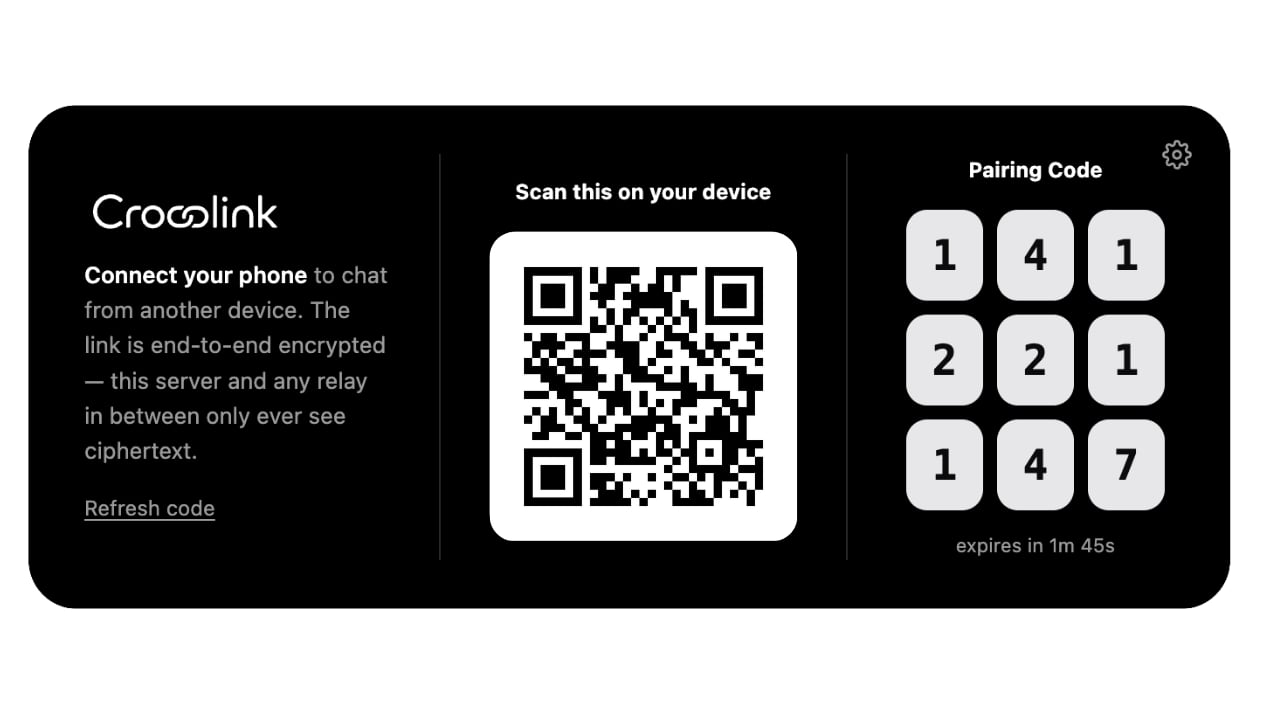
app is the reference integration. It keeps Crosslink in Electron's main process
and gives the sandboxed renderer narrow IPC operations for status, pairing
sessions/mode changes, messages, revocation, and pairing lifecycle events. A
custom `PairingSource` adapts that bridge to the same `createPairingCard()` used
by HTTP-hosted desktop pages; the example does not implement its own QR, code,
refresh, or invalidation UI.
```bash theme={null}
npm install
npm run dev -w @crosslink/example-electron-chat
```
 ## Process boundary
| Process | Holds | Must not hold |
| -------- | ----------------------------------------------------------- | ----------------------------------------- |
| Main | Crosslink host, identity, grants, relay tokens, approval UI | Remote renderer code |
| Preload | Narrow validated IPC wrappers and event subscriptions | Raw `ipcRenderer` |
| Renderer | Display state and user input | Node.js, filesystem, keys, service tokens |
The example uses `contextIsolation: true`, `sandbox: true`,
`nodeIntegration: false`, `webSecurity: true`, a restrictive CSP, denied
permissions, denied navigation/windows, and exact IPC sender validation. Its UI
loads through a registered secure custom protocol rather than `file://`.
## Host configuration
```ts theme={null}
const host = createCrosslinkServer({
application: { id: "com.example.app", name: "My Electron App" },
storageDir: path.join(app.getPath("userData"), "crosslink"),
capabilities: [
{ id: "app.read", title: "Read app data", risk: "low" },
{ id: "app.change", title: "Change app data", risk: "medium" }
],
lan: { enabled: true, bind: "all" },
networkMode: "lan-and-relay",
signalingUrl: process.env.CROSSLINK_SIGNALING_URL,
relayUrl: process.env.CROSSLINK_RELAY_URL,
signalingToken: process.env.CROSSLINK_SIGNALING_TOKEN,
relayToken: process.env.CROSSLINK_RELAY_TOKEN,
security: {
hybridPq: "preferred",
maxDevices: 12,
maxActivePairingSessions: 2,
pairingRateLimitMs: 5_000
},
pairing: {
autoApprove: false,
notifyApprovalRequest: (request) => showNativeNotification(request),
approve: (request) => showNativeApprovalDialog(request)
}
});
```
Crosslink probes Electron `safeStorage` after `app.whenReady()` and stores only
its encrypted ciphertext under `userData`. If OS encryption is unavailable it
uses the encrypted-file backend; it never silently selects plaintext.
## Reachable from any network
Use authenticated HTTPS signaling and relay endpoints for predictable remote
reachability:
```bash theme={null}
CROSSLINK_NETWORK_MODE=lan-and-relay \
CROSSLINK_SIGNALING_URL=https://signal.example.com \
CROSSLINK_RELAY_URL=https://relay.example.com \
CROSSLINK_SIGNALING_TOKEN='from-your-secret-manager' \
CROSSLINK_RELAY_TOKEN='from-your-secret-manager' \
npm run dev -w @crosslink/example-electron-chat
```
The example refuses non-HTTPS service URLs. For a direct router mapping, set
`CROSSLINK_NETWORK_MODE=remote`; startup fails if it cannot establish a real
remote route. Never expose a renderer HTTP control panel on `0.0.0.0`; only the
encrypted Crosslink transport should bind to the LAN/public interface.
## Package installers
```bash theme={null}
npm run dist -w @crosslink/example-electron-chat
```
`electron-builder` produces macOS, Windows, or Linux artifacts on the matching
host OS. Production releases still need your platform signing identity,
notarization, and update-signing configuration.
Do not enable `autoApprove` in a distributed app. A notification is advisory;
only the local approval callback can authorize the pairing.
## Process boundary
| Process | Holds | Must not hold |
| -------- | ----------------------------------------------------------- | ----------------------------------------- |
| Main | Crosslink host, identity, grants, relay tokens, approval UI | Remote renderer code |
| Preload | Narrow validated IPC wrappers and event subscriptions | Raw `ipcRenderer` |
| Renderer | Display state and user input | Node.js, filesystem, keys, service tokens |
The example uses `contextIsolation: true`, `sandbox: true`,
`nodeIntegration: false`, `webSecurity: true`, a restrictive CSP, denied
permissions, denied navigation/windows, and exact IPC sender validation. Its UI
loads through a registered secure custom protocol rather than `file://`.
## Host configuration
```ts theme={null}
const host = createCrosslinkServer({
application: { id: "com.example.app", name: "My Electron App" },
storageDir: path.join(app.getPath("userData"), "crosslink"),
capabilities: [
{ id: "app.read", title: "Read app data", risk: "low" },
{ id: "app.change", title: "Change app data", risk: "medium" }
],
lan: { enabled: true, bind: "all" },
networkMode: "lan-and-relay",
signalingUrl: process.env.CROSSLINK_SIGNALING_URL,
relayUrl: process.env.CROSSLINK_RELAY_URL,
signalingToken: process.env.CROSSLINK_SIGNALING_TOKEN,
relayToken: process.env.CROSSLINK_RELAY_TOKEN,
security: {
hybridPq: "preferred",
maxDevices: 12,
maxActivePairingSessions: 2,
pairingRateLimitMs: 5_000
},
pairing: {
autoApprove: false,
notifyApprovalRequest: (request) => showNativeNotification(request),
approve: (request) => showNativeApprovalDialog(request)
}
});
```
Crosslink probes Electron `safeStorage` after `app.whenReady()` and stores only
its encrypted ciphertext under `userData`. If OS encryption is unavailable it
uses the encrypted-file backend; it never silently selects plaintext.
## Reachable from any network
Use authenticated HTTPS signaling and relay endpoints for predictable remote
reachability:
```bash theme={null}
CROSSLINK_NETWORK_MODE=lan-and-relay \
CROSSLINK_SIGNALING_URL=https://signal.example.com \
CROSSLINK_RELAY_URL=https://relay.example.com \
CROSSLINK_SIGNALING_TOKEN='from-your-secret-manager' \
CROSSLINK_RELAY_TOKEN='from-your-secret-manager' \
npm run dev -w @crosslink/example-electron-chat
```
The example refuses non-HTTPS service URLs. For a direct router mapping, set
`CROSSLINK_NETWORK_MODE=remote`; startup fails if it cannot establish a real
remote route. Never expose a renderer HTTP control panel on `0.0.0.0`; only the
encrypted Crosslink transport should bind to the LAN/public interface.
## Package installers
```bash theme={null}
npm run dist -w @crosslink/example-electron-chat
```
`electron-builder` produces macOS, Windows, or Linux artifacts on the matching
host OS. Production releases still need your platform signing identity,
notarization, and update-signing configuration.
Do not enable `autoApprove` in a distributed app. A notification is advisory;
only the local approval callback can authorize the pairing.